Did you know that you can navigate the posts by swiping left and right?
Small gains from more cores in laptops
26 Dec 2019
. category:
hardware
.
Comments
#hardware
#intel
#cpu
I recently searched for a photo-editing laptop for my sister. Here are my thoughts on CPUs with more cores.
The frequency limit
The maximum CPU frequency has barely grown for years because of physical limits. That’s the main reason why performance now grows by adding cores - which is easy when power consumption doesn’t matter.
On laptops, power efficiency is crucial. To add cores and keep the same TDP (a CPU power consumption indicator, in watts), manufacturers had to save power somewhere.
The cost of higher performance
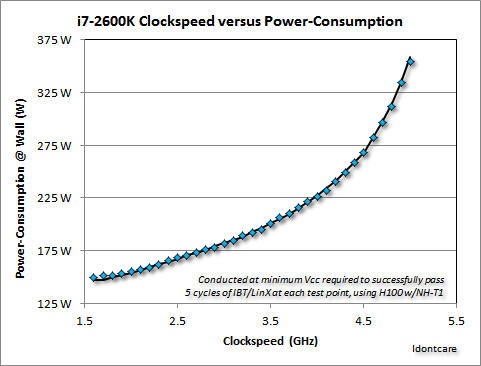
Power ~ Frequency × Voltage²
A higher frequency also needs a higher voltage, so power grows much faster than frequency. The chart shows a desktop CPU: above 4 GHz its power consumption shoots up. Mobile CPUs stay on the more linear part of the curve. The price is a lower maximum frequency (even lower when more cores are loaded), and that’s where the savings come from.
Take an easily parallelizable task and run it on one core at 4 GHz or on 4 cores at 1 GHz. Both give an effective 4 GHz and finish at the same time, but the 4 cores run at a much lower voltage, so they use less power.
Unfortunately, many tasks don’t scale well across multiple cores. That’s why single-core performance matters most for a CPU’s “productivity” score.
Where are the gains?
Let’s compare a 9th-gen 4-core CPU with a 6-core one. Both have a 45 W TDP.
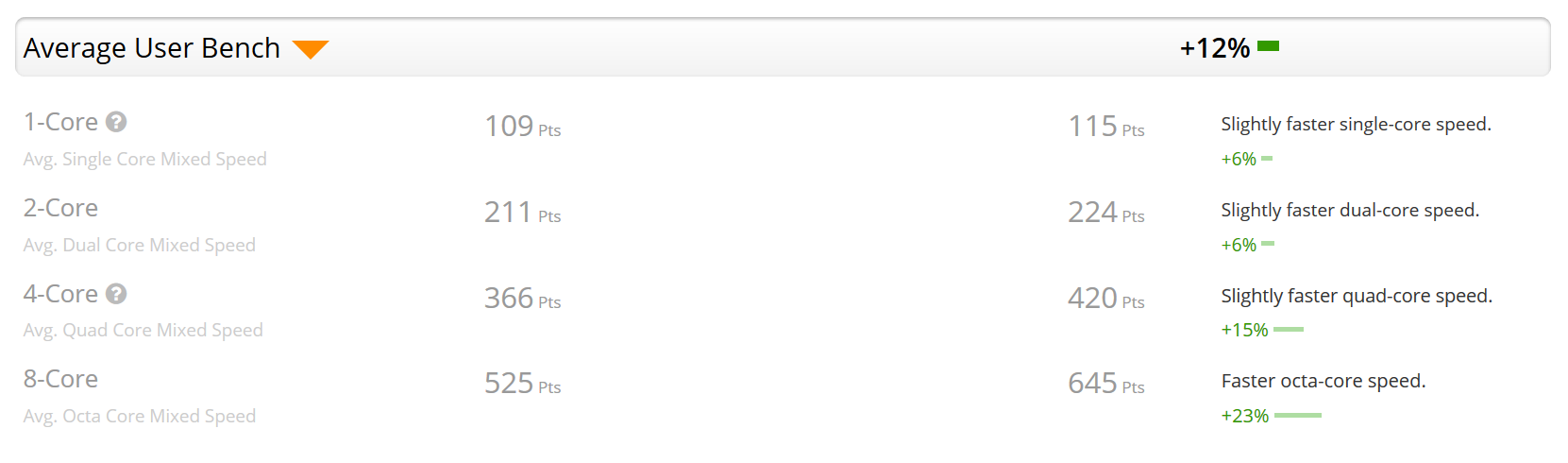
- Single-thread performance is higher thanks to slightly higher clock speeds.
- Without power limits, 50% more cores would give 50% more performance in the 8-thread test. Within the same 45 W it’s only 23%.
- Performance per watt is almost identical for both CPUs.
Conclusions
- The higher the TDP (the looser the power limits), the bigger the gains from more cores.
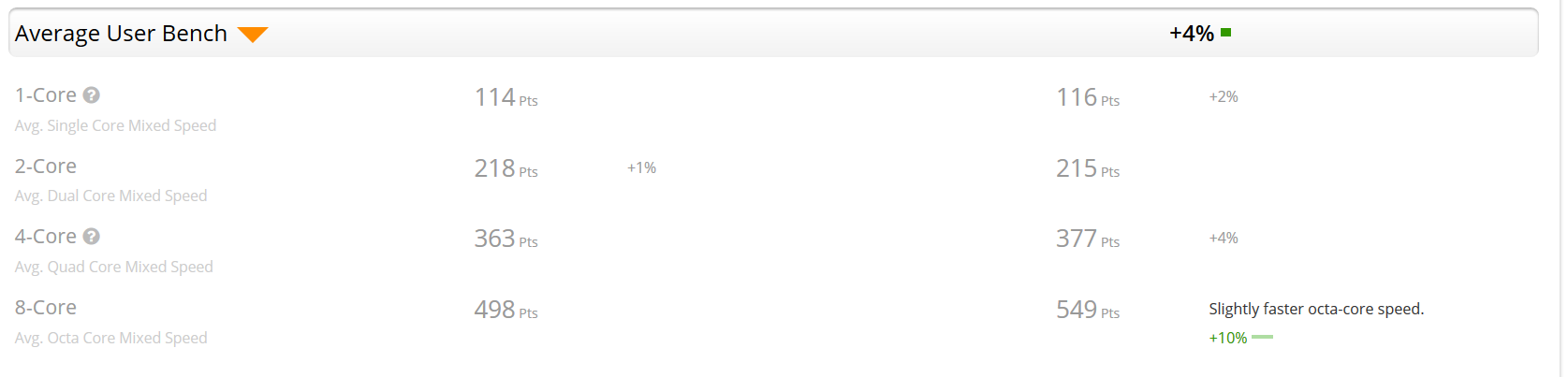
- U-series CPUs (15 W TDP) gain the least - see the 10th-gen comparison below.
- For productivity, the gains are marginal. Think twice before paying extra for more cores. Today 4 cores are optimal in a U-series CPU; in the H series, more than 4 cores pay off for some professions.
- ULV CPUs will cheat on TDP even more when plugged in, to use their much higher performance potential. With Turbo Boost, Intel already cheats on TDP declarations.
10th-gen 4-core i5-10210U vs 6-core i7-10710U:
Why pricier CPUs still get higher clock speeds
There are two more reasons why more expensive CPUs reach higher clock speeds at the same TDP:
- Better wafer area. A wafer is the silicon disc CPUs are cut from. Statistically, the closer to the centre, the better the material, and better material means slightly better efficiency and higher maximum clock speeds.
- Marketing. The difference in material quality is far too small to make people buy more expensive CPUs. The same TDP with higher clock speeds suggests that you pay more for something better. You can try to get around this artificial part of the limits by undervolting.
Performance and efficiency improve only a little from one generation to the next, so don’t be afraid to buy a used machine.
Finally, compare an extremely expensive top 9th-gen mobile CPU (8 cores) with a regular high-end 8th-gen desktop CPU (6 cores).
PS: Asus lists the colour gamut of each display option in the specs, which is crucial for photography.
PS2: For higher-quality gaming, consider a desktop in an SFF case. For casual gaming, an eGPU keeps your laptop mobile.

Waldemar Wosiński - Scala & Big Data engineer, father and motorcyclist ;)